JuzaPhoto uses technical cookies and third-part cookies to provide the service and to make possible login, choice of background color and other settings (click here for more info).

By continuing to browse the site you confirm that you have read your options regarding cookies and that you have read and accepted the Terms of service and Privacy.


OK, I confirm


You can change in every moment your cookies preferences from the page Cookie Preferences, that can be reached from every page of the website with the link that you find at the bottom of the page; you can also set your preferences directly here

Accept Cookies Customize Refuse Cookies
RCE Foto


Login Logout Join JuzaPhoto!

X-trasformer beta 3 - (parte 2)


  1. Forum
  2. »
  3. Fotocamere, Accessori e Fotoritocco
  4. »
  5. Mirrorless Fuji
  6. » X-trasformer beta 3 - (parte 2)


user117231
avatar
sent on 26 Marzo 2017 (20:18)    

La prossima settimana lo compro...
e poi sarò più preciso nel dirvi se veramente ne valeva la pena.

avatarsenior
sent on 26 Marzo 2017 (20:30)    

Pardon, pensavo fossero Raf. Cmq C1 fa un gran bel lavoro. Mi piace di più di Lr, ma può essere che con Lr è più complicato trovare la quadra dello sharpening.

Ma adesso le differenze fra Lr ed X-T le abbiamo più o meno capite. Invece le differenze con C1 fra DNG/Raf sono marcate?

avatarsenior
sent on 26 Marzo 2017 (20:49)    

Usando ixt solo per convertite con tutto a none è la scelta migliore. Si può fare tutto poi e il file resta sempre naturale, pulito e con la grana fuji.
Sì, vale i soldi spesi. Permette un impatto minimo su qualsiasi workflow.

avatarsenior
sent on 26 Marzo 2017 (21:13)    

Anch'io sono per tutti i parametri a zero, infatti l'ho detto fin da subito. Però capisco anche che una spintarella la si può dare; la tesi di pre-sharp con poi sharp finale è cmq valida. Dico solo che dev'essere minima perché purtroppo poi si vede non c'è niente da fare, il problema che oltre a vedersi risulta finto ed innaturale.

avatarsupporter
sent on 27 Marzo 2017 (8:24)    

Scusate una domanda.... stupida.... ma sul sito del produttore non c'è possibilità di acquistare il Transformer ... Solo il developer ? Avete idea di dove si possa acquistare ?
Grazie

avatarsenior
sent on 27 Marzo 2017 (9:36)    

www.iridientdigital.com/products/xtransformer_purchase.html

@Kame dopo aver creato il file con I-XT con cosa lo lavori ??? se LR/ACR come fai lo sharpening ???

grazie mille, fra qualche giorno ve ne spiegherò i motivi ;-)
diciamo che vorrei definire una volta per tutte il mio flusso di lavoro visto che quello attuale non mi soddisfa pienamente in quanto il passaggio Capture One -> PS appesantisce un po' il file... potrei tornare a lavorare con LR (valutando bene i pro e i contro)

avatarsenior
sent on 27 Marzo 2017 (9:39)    

Prova qui.
transformers.hasbro.com/en-us

Oppure qui.
www.iridientdigital.com/products/

avatarsenior
sent on 27 Marzo 2017 (9:42)    

Devi prendere la developer e poi al momento dell'installazione andare su "Register".
la versione è solo quella.
Poi ti daranno un link dove controllare gli aggiornamenti

avatarsupporter
sent on 27 Marzo 2017 (10:03)    

Grazie @Newbobolix, attendo anche io flusso con setting da provare ....
Grazie

avatarsenior
sent on 27 Marzo 2017 (11:17)    

Maxpina che programma usi per lo sviluppo ???
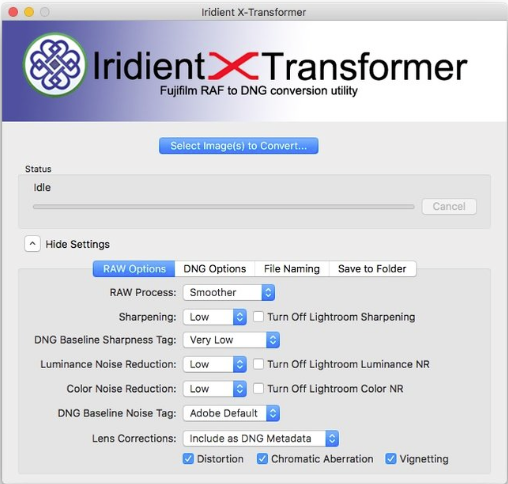
una buona base di partenza per il DNG è quella indicata da RobertoF


puoi anche provare con demosaicing "more detailed" e sharpening "none"

avatarsupporter
sent on 27 Marzo 2017 (12:15)    

Maxpina che programma usi per lo sviluppo ???

Ligtroom CC ..

avatarsenior
sent on 27 Marzo 2017 (12:30)    

@Maxpina
ti consiglio allora di flaggare i vari "TURN OFF LIGHTROOM" per evitare di applicare due volte lo sharpening e noise reduction

avatarjunior
sent on 27 Marzo 2017 (13:10)    

blog.thomasfitzgeraldphotography.com/blog/2017/3/tips-for-using-iridie

avatarsenior
sent on 27 Marzo 2017 (13:36)    

Questa è da incorniciare MrGreenMrGreen

Apply Settings First

You should set your settings before you do anything else, and then add your images to the software. As soon as you add images to it, it will start processing, so be sure to change your settings first.

avatarsenior
sent on 27 Marzo 2017 (13:38)    

Sta dicendo di impostare prima di caricare il Raf, cioè in pratica di impostarle già di default.
Chissà perché!?

What do you think about this topic?


Do you want to tell your opinion? You can join the discussion by joining JuzaPhoto, it is easy and free!

There is more: by registering you can create your personal page, publish photos, receive comments and you can use all the features of JuzaPhoto. With more than 257000 members, there is space for everyone, from the beginner to the professional.


RCE Foto

Publish your advertisement on JuzaPhoto (info)


 ^

JuzaPhoto contains affiliate links from Amazon and Ebay and JuzaPhoto earn a commission in case of purchase through affiliate links.

Mobile Version - juza.ea@gmail.com - Terms of use and Privacy - Cookie Preferences - P. IVA 01501900334 - REA 167997- PEC juzaphoto@pec.it

May Beauty Be Everywhere Around Me