JuzaPhoto uses technical cookies and third-part cookies to provide the service and to make possible login, choice of background color and other settings (click here for more info).

By continuing to browse the site you confirm that you have read your options regarding cookies and that you have read and accepted the Terms of service and Privacy.


OK, I confirm


You can change in every moment your cookies preferences from the page Cookie Preferences, that can be reached from every page of the website with the link that you find at the bottom of the page; you can also set your preferences directly here

Accept Cookies Customize Refuse Cookies
RCE Foto


Login Logout Join JuzaPhoto!

Profilo colore fotocamera su Capture One - help


  1. Forum
  2. »
  3. Fotocamere, Accessori e Fotoritocco
  4. »
  5. Capture One
  6. » Profilo colore fotocamera su Capture One...


PAGE: ALL PAGES | NEXT PAGE »

avatarjunior
sent on 05 Ottobre 2023 (19:33)    

Ciao, info: ho scattato dei raw b/n con sony a9 e impostazioni personalizzate. Importo in C1 e il b/n scompare e mi ritrovo la foto a colori. Cosa devo impostare per mantenere le impostazioni di scatto? Ovviamente scatto in RAW.
Grazie

avatarsenior
sent on 05 Ottobre 2023 (19:36)    

Imposta C1 in B/N oppure utilizza la simulazione B/N per la tua fotocamera

avatarjunior
sent on 06 Ottobre 2023 (13:54)    

In che senso? Non tutte le foto sono in b/n . Dovrebbe riconoscere il profilo e riproporlo in c1.

avatarsenior
sent on 06 Ottobre 2023 (14:56)    

Il B/N impostato in macchina agisce solo sul JPEG, il RAW rimane a colori … però C1 dovrebbe leggere il preset impostato in macchina e quindi dovresti visualizzare il file demosaicizzato in B/N

avatarjunior
sent on 09 Ottobre 2023 (16:09)    

Questo intendevo ma non accade. Dove controllo?

avatarsenior
sent on 09 Ottobre 2023 (16:47)    

Temo che, non essendo un software proprietario (Sony), quelle regolazioni le perdi

avatarjunior
sent on 09 Ottobre 2023 (17:08)    

caspita. Leggevo che dovrebbe mandtenerle

avatarsenior
sent on 09 Ottobre 2023 (17:15)    

Fai prima a rifarlo e applicarlo a tutte le foto con le eventuali e necessarie variazioni.

avatarsenior
sent on 09 Ottobre 2023 (17:27)    

“caspita. Leggevo che dovrebbe mandtenerle”

Io le regolazioni le faccio solo in post, lo trovo più comodo,per cui non ci giurerei che non ci sia la soluzione

avatarsenior
sent on 09 Ottobre 2023 (18:00)    

Questo intendevo ma non accade. Dove controllo?


Ho controllato meglio (uso C1 saltuariamente da quando hanno cambiato politica sulle licenze passando ad abbonamento) in effetti lo scatto in B/N il visualizzatore lo legge come tale perché prende il JPEG ma se apri il RAW lo demosaicizza (correttamente) a colori ... non ti resta che comprare una Monochrom MrGreen

avatarsenior
sent on 10 Ottobre 2023 (16:06)    

Ma c1 ti permette di vedere il raw e di operare in B/N anche se in origine è a colori.

avatarsenior
sent on 10 Ottobre 2023 (16:28)    

Ma c1 ti permette di vedere il raw e di operare in B/N anche se in origine è a colori.


Spiegati meglio ...

avatarsenior
sent on 10 Ottobre 2023 (17:29)    

allora dato che una immagine vale poiù di mille parole

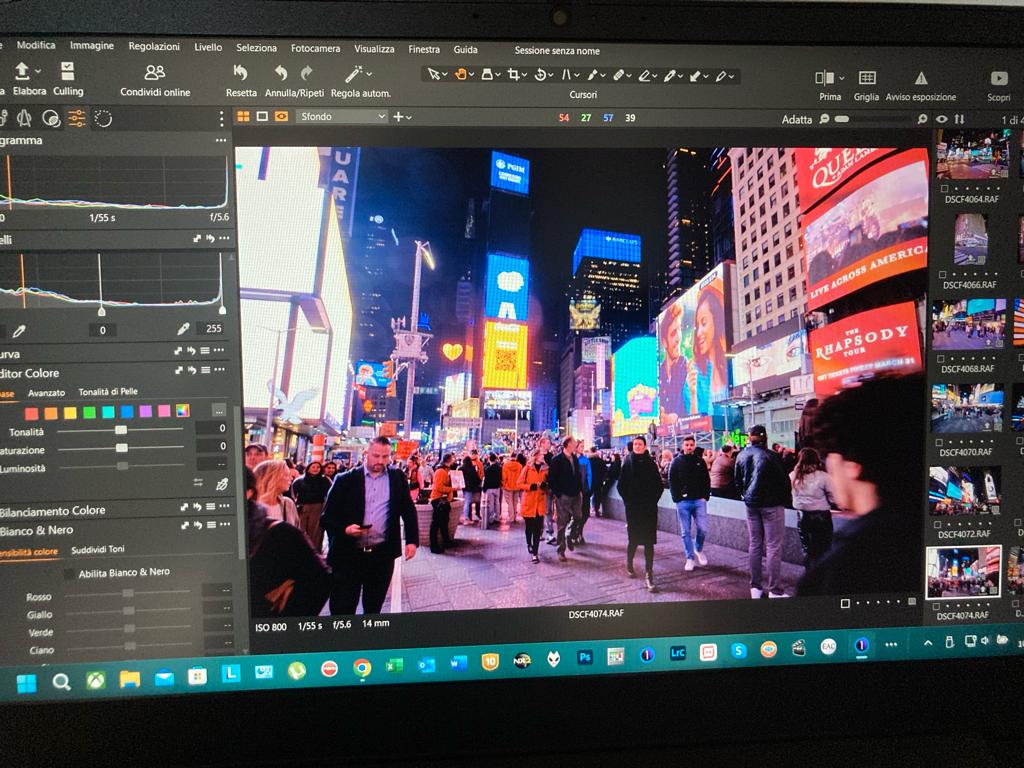
Questo è il file raw a colori in C1


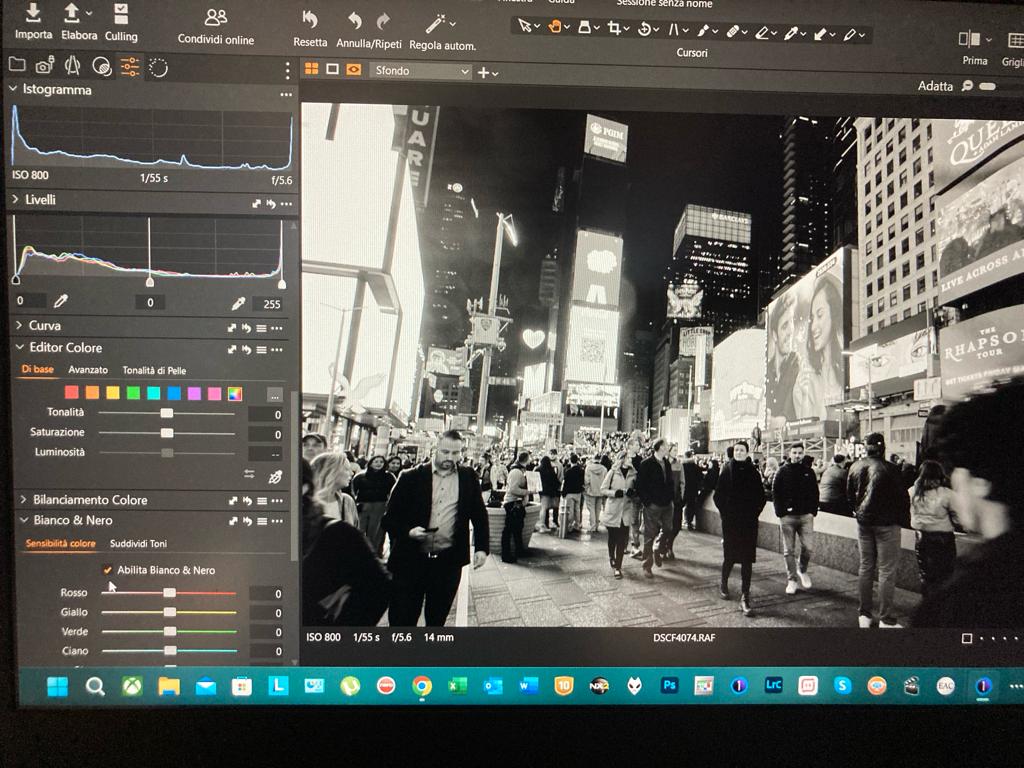
come vedi in basso a sinistra c'è un flag che puoi mettere che dice abilita bianco e nero.
Abilitando bianco e nero l'immagine raw diventa


avatarjunior
sent on 10 Ottobre 2023 (18:48)    

Lo devo specificare per ogni foto? O lo prende in automatico per tutti i file una impostato su una?

avatarjunior
sent on 10 Ottobre 2023 (18:58)    

Attivando la casella, la foto viene convertita in b/n, ma non viene applicato il profilo della fotocamera...

What do you think about this topic?


Do you want to tell your opinion? You can join the discussion by joining JuzaPhoto, it is easy and free!

There is more: by registering you can create your personal page, publish photos, receive comments and you can use all the features of JuzaPhoto. With more than 258000 members, there is space for everyone, from the beginner to the professional.


RCE Foto

Publish your advertisement on JuzaPhoto (info)
PAGE: ALL PAGES | NEXT PAGE »


 ^

JuzaPhoto contains affiliate links from Amazon and Ebay and JuzaPhoto earn a commission in case of purchase through affiliate links.

Mobile Version - juza.ea@gmail.com - Terms of use and Privacy - Cookie Preferences - P. IVA 01501900334 - REA 167997- PEC juzaphoto@pec.it

May Beauty Be Everywhere Around Me