What do you think about this photo?
Do you have questions or curiosities about this image? Do you want to ask something to the author, give him suggestions for improvement, or congratulate for a
photo that you really like?
You can do it by joining JuzaPhoto, it is easy and free!
There is more: by registering you can create your personal page, publish photos, receive comments and you can use all the features of JuzaPhoto.
With more than 260000members, there is space for everyone, from the beginner to the professional.
|
|
sent on 29 Dicembre 2011 (20:26) | This comment has been automatically translated (show/hide original)
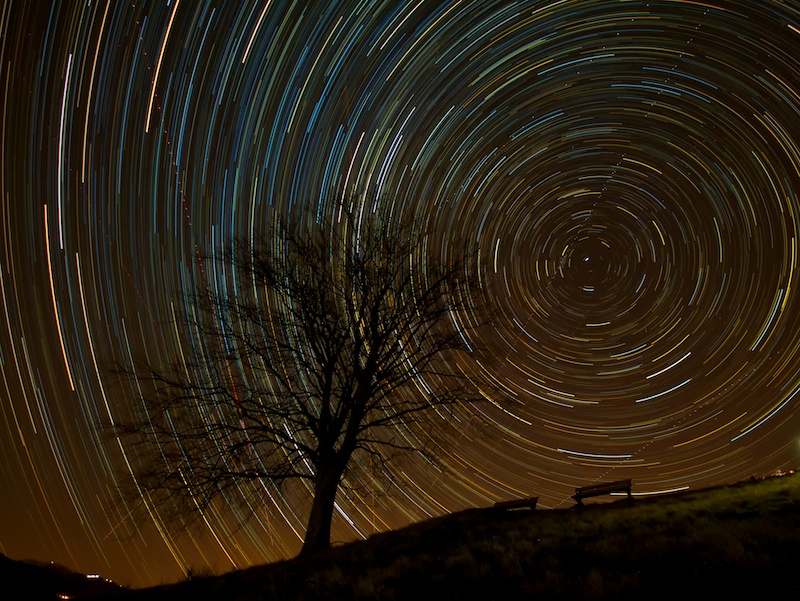
Very beautiful! sin only for all those planes! the sky background a bit 'yellow can be corrected in PP.
hello
Clear Molto bella! peccato solo per tutti quegli aerei! il fondo cielo un po' giallino si può correggere in PP.
ciao
Chiara |
|
|
sent on 30 Dicembre 2011 (0:27) | This comment has been automatically translated (show/hide original)
Thanks for the ride! are just starting post-production ... come from years of film :-)
Can you give me some advice on how to correct the color of the sky?
Thanks
Andrea Grazie del passaggio!!! sono alle prime armi di post produzione... vengo da anni di pellicola :-)
Sapresti darmi qualche dritta su come correggere il colore del cielo?
Grazie
Andrea |
|
|
sent on 30 Dicembre 2011 (9:30) | This comment has been automatically translated (show/hide original)
I can give you two suggestions flying:
maybe a mask created using the threshold to separate the luminous traces from the rest.
Use the Color Replacement function that gives you maximum control over tolerance on which to apply the color and tone to correct. Also gives you control over the brightness allowing you to make out the details of the tree against the light without having the feeling of mix everything.
Or take a picture during the blue hour figure having to select the right WB to pick the shade of blue of the sky (see my photo with the two constellations shown on this forum).
Take photos of the stars and merge the two frames with blending mode "Lighten".
What will happen is that PS will take the lightest pixels, the stars and the blue sky certainly brighter than your background sky. The effect is natural and will not have to fix anything.
hello Ti posso dare due suggerimenti volanti:
creati una maschera magari utilizzando la funzione soglia per separare le tracce luminose dal resto.
Usa la funzione sostituzione colore che ti da massimo controllo sulla tolleranza su cui applicare il colore e sulla tonalità da correggere. Ti da inoltre il controllo sulla luminosità permettendoti di fare emergere i dettagli dell'albero in contro luce senza avere la sensazione di impastare il tutto.
Oppure scatta una fotografia durante l'ora blu avendo gura di selezionare il giusto WB per cogliere la sfumatura azzurra del cielo (vedi la mia foto con le due costellazioni sempre in questo forum).
Scatta le foto delle stelle e unisci i due fotogrammi con metodo di fusione "schiarisci".
Quello che succederà è che PS prendera i pixel più chiari: le stelle e il cielo blu sicuramente più luminoso del tuo fondo cielo. L'effetto sarà naturale e non dovrai correggere nulla.
ciao |
|
|
sent on 30 Dicembre 2011 (10:29) | This comment has been automatically translated (show/hide original)
PS Go to Image-> Adjustments-> levels. There are three pipette on the right, select the black double click and set the RGB values ??close to 20 (for not having a pure black, not pleasant). You can play a bit 'of values, for example, I use r 19, g19, 20 b, for a shade a bit more blue. This is done by the OK and the pipette select a point in the picture where the sky is yellow, you'll see that it will darken. You have to do tests in several points to choose the one that gives you the best result and maybe even after moving the gray triangle of values ??a bit 'higher than one, to lighten a bit' all. Not to push too hard you can create two levels and correct portions of the sky separately, then merge the layers. At the end you can use the color balance to remove a little 'yellow residue. I tried to do these tasks on your photo:
[IMG]http://imageshack.us/f/408/gal5028519065844dopo.jpg/[/IMG]
Of course, working on the original uncompressed enon so fast as I did is even better, you can try to keep lighter or darker than the background sky, as like most of you.
hello
Clear Con PS vai su immagine->regolazioni->livelli. Ci sono tre pipette sulla destra, selezioni quella nera cliccando due volte e imposti dei valori RGB prossimi a 20 (per non avere un nero puro, non gradevolissimo). Puoi giocare un po' sui valori, io per esempio uso r 19, g19, b 20, per avere una tonalità un pelo più blu. Fatto questo dai l'ok e con la pipetta selezioni un punto della foto dove il cielo è giallo, vedrai che si scurirà. Devi fare prove in più punti per scegliere quello che ti da risultato migliore e magari dopo sposta anche il triangolino grigio su valori un po' più alti di uno, per schiarire un po' il tutto. Per non forzare troppo puoi creare due livelli e correggere le porzioni di cielo separatamente, poi unisci i livelli. Alla fine puoi usare il bilanciamento colori per togliere ancora un po' di giallo residuo. Ho provato a fare queste operazioni sulla tua foto:
[IMG]http://imageshack.us/f/408/gal5028519065844dopo.jpg/[/IMG]
Naturalmente lavorando sull'originale non compresso e non così di corsa come ho fatto io viene pure meglio, puoi provare a tenere più chiaro o più scuro il fondo cielo, come piace di più a te.
ciao
Chiara |
|
|
sent on 30 Dicembre 2011 (18:42) | This comment has been automatically translated (show/hide original)
that mean?? Thank you so much!! more comprehensive than that!! I immediately start to 'work .... thank you again! che dire??? Grazie mille!!!! più esauriente di così!!!! mi metto subito all' opera.... grazie ancora!!! |
|
|
sent on 03 Gennaio 2012 (19:19) | This comment has been automatically translated (show/hide original)
Really a nice shot do not hide my envy:-D for the rest I agree with minor corrections suggested by my predecessor Veramente un bello scatto non nascondo la mia invidia  per il resto concordo con le piccole correzioni suggerite da chi mi ha preceduto per il resto concordo con le piccole correzioni suggerite da chi mi ha preceduto |
|
|
sent on 03 Gennaio 2012 (19:21) | This comment has been automatically translated (show/hide original)
It reminds me of certain paintings by Van Gogh, with the trees and the starry sky full of bright vortices.
Something PP could do anyway.
Congratulations, hello. :-) Mi ricorda certi quadri di Van Gogh, con gli alberi e il cielo stellato pieno di vortici luminosi.
Qualcosa in PP si potrebbe comunque fare.
Complimenti, ciao.  |
|
|
sent on 04 Gennaio 2012 (14:25) | This comment has been automatically translated (show/hide original)
Thanks for the ride!!
Grazie del passaggio!!!!
|
|
|
sent on 27 Febbraio 2012 (18:23) | This comment has been automatically translated (show/hide original)
how do you take pictures like that? : (Envy come si fa a fare foto così? :( invidia |
|

Publish your advertisement on JuzaPhoto (info) |



 JuzaPhoto contains affiliate links from Amazon and Ebay and JuzaPhoto earn a commission in case of purchase through affiliate links.


 Resize to fit window