RCE Foto


Login LogoutJoin JuzaPhoto!
JuzaPhoto uses technical cookies and third-part cookies to provide the service and to make possible login, choice of background color and other settings (click here for more info).

By continuing to browse the site you confirm that you have read your options regarding cookies and that you have read and accepted the Terms of service and Privacy.


OK, I confirm


You can change in every moment your cookies preferences from the page Cookie Preferences, that can be reached from every page of the website with the link that you find at the bottom of the page; you can also set your preferences directly here

Accept CookiesCustomizeRefuse Cookies


  1. Galleries
  2. »
  3. Landscape (wilderness)
  4. » Sublime Quiet

 
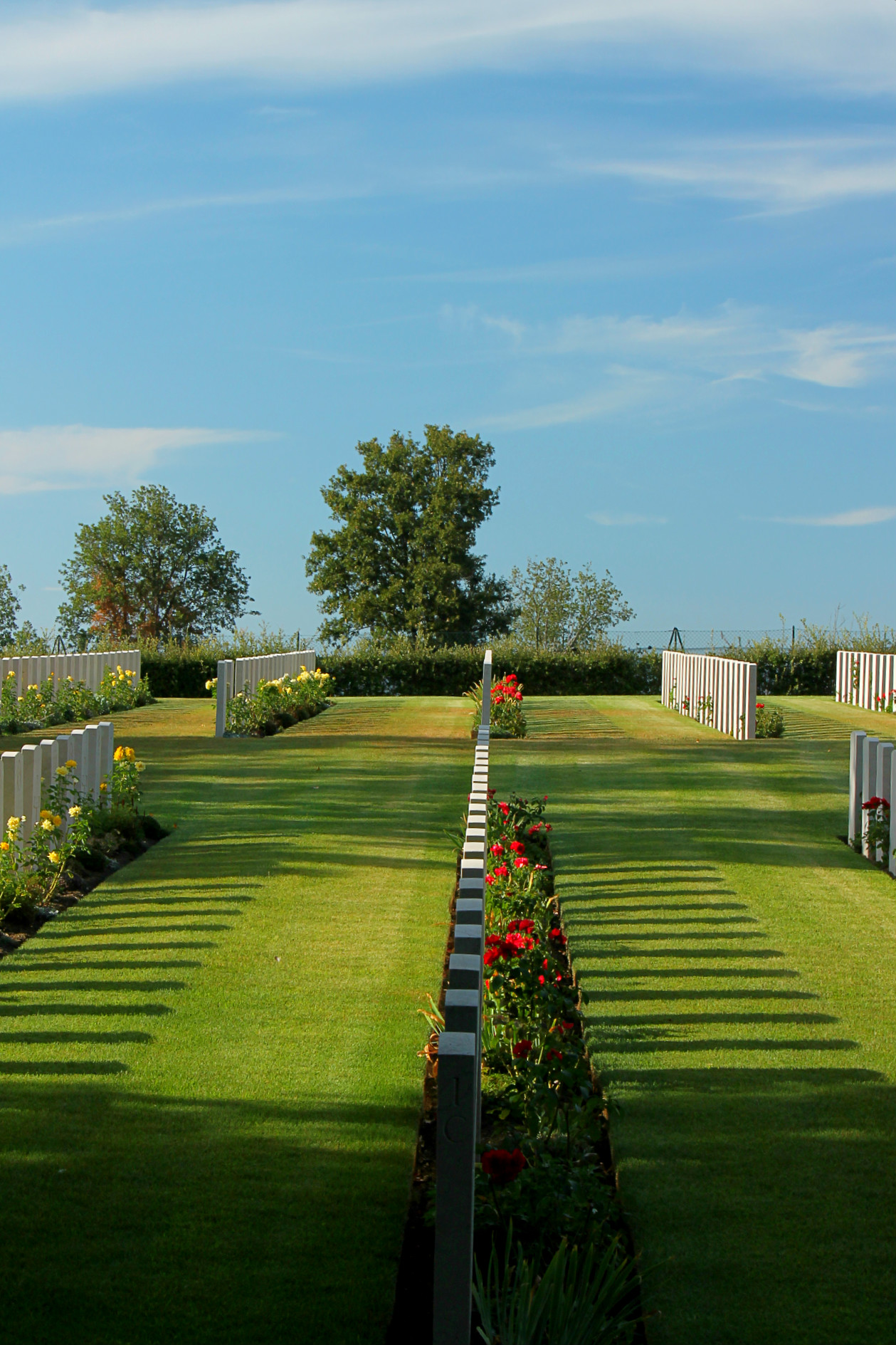
Sublime Quiet...

Paesaggi

View gallery (12 photos)

Sublime Quiet sent on September 03, 2012 (17:15) by Andrea Manzi. 3 comments, 506 views.

at 55mm, 1/30 f/16.0, ISO 100, hand held.


View High Resolution 2.4 MP  


What do you think about this photo?


Do you have questions or curiosities about this image? Do you want to ask something to the author, give him suggestions for improvement, or congratulate for a photo that you really like?


You can do it by joining JuzaPhoto, it is easy and free!

There is more: by registering you can create your personal page, publish photos, receive comments and you can use all the features of JuzaPhoto. With more than 256000 members, there is space for everyone, from the beginner to the professional.


avatarjunior
sent on September 03, 2012 (17:20)


This comment is too long to be automatically translated, so it will be shown in its original language (Italian)  

Click here to translate the comment in English [en]


Ho ripreso il file originale e ci ho lavorato un po,la pubblico al posto della vecchia. Ho provato a ridurre l'effetto storto e la pastosità in alcune zone dovuta allo sfocato. Commentate grazie :-P

I picked up the original file and I worked a little, the public place of the old. I tried to reduce the effect of wrong and softness in some areas due to blurred. Commented thanks:-P

avatarmoderator
sent on September 03, 2012 (18:06)


This comment is too long to be automatically translated, so it will be shown in its original language (Italian)  

Click here to translate the comment in English [en]


Decisamente meglio di quella precedente . Era però più corretto che tu postassi questa interpretazione all'interno di quel topic che tu hai cancellato perchè cancellandolo hai reso orfano il link di quel titolo e hai cancellato tutti gli interventi (feedback) di quei forumisti che hanno dedicato del loro prezioso tempo a commentare quella foto Sorry . Forumisti (esempio Fracas, Teresa Barberio, Elleemme etc..) che hanno contribuito ad approfondire gli errori: gli aspetti pastosi, gli artefatti, di inclinazione e di profondità di campo che erano emersi Confuso.

Questo è il link orfano:
www.juzaphoto.com/galleria.php?cat=singola&t=221466&l=it

e questa era la foto che avevi precedentemente postato:


Penso che tu sia concorde che quella che tu hai ora postato in questo topic ne abbia guadagnato su tutti i fronti e che per evitare un decadere di qualità e per enfatizzare il senso flou la prossima volta è preferibile aprire il diaframma senza far emergere la diffrazione e senza ricorrere a photoshop giocando con l'effetto sfocato.

ciao e buona luce, lauro


Far better than the previous one. But it was more correct than you posting it in this interpretation of the topic that you have deleted because deleting orphaned link that title and have deleted all interventions (feedback) forumisti of those who have spent their valuable time to comment that photo :-|. Forumisti (eg Fracas, Teresa Barberio, ElleEmme etc. ..) that have helped to deepen errors: pasty aspects, artifacts, tilt and depth of field that emerged: fconfuso:.

This is the link orphan
www.juzaphoto.com/galleria.php?cat=singola&t=221466&l=it

and this was the photo that you had previously posted:
[IMG]http://imageshack.us/a/img341/6817/221466.jpg [/IMG]

I think you agree that what you have now posted in this topic he has earned on all fronts and to prevent a decline of quality and to emphasize the sense flou the next time it is preferable to open the iris without revealing the diffraction and without resorting to playing with photoshop blur.

hello and good light, laurel


avatarjunior
sent on September 04, 2012 (4:09)


This comment is too long to be automatically translated, so it will be shown in its original language (Italian)  

Click here to translate the comment in English [en]


Grazie lauro,non ci avevo proprio pensato! Grazie anche per la guida che mi hai mandato, mi sarà utile!:-P

Thanks Laurel, I had not thought of that! Thanks also for the guide you sent me, I will help! :-P


RCE Foto

Publish your advertisement on JuzaPhoto (info)

Some comments may have been automatically translated with Microsoft Translator.  Microsoft Translator


 ^

JuzaPhoto contains affiliate links from Amazon and Ebay and JuzaPhoto earn a commission in case of purchase through affiliate links.

Mobile Version - juza.ea@gmail.com - Terms of use and Privacy - Cookie Preferences - P. IVA 01501900334 - REA 167997- PEC juzaphoto@pec.it

May Beauty Be Everywhere Around Me