What do you think about this photo?Do you have questions or curiosities about this image? Do you want to ask something to the author, give him suggestions for improvement, or congratulate for a photo that you really like?
You can do it by joining JuzaPhoto, it is easy and free!
There is more: by registering you can create your personal page, publish photos, receive comments and you can use all the features of JuzaPhoto. With more than 256000 members, there is space for everyone, from the beginner to the professional.
| sent on January 25, 2016 (20:30)
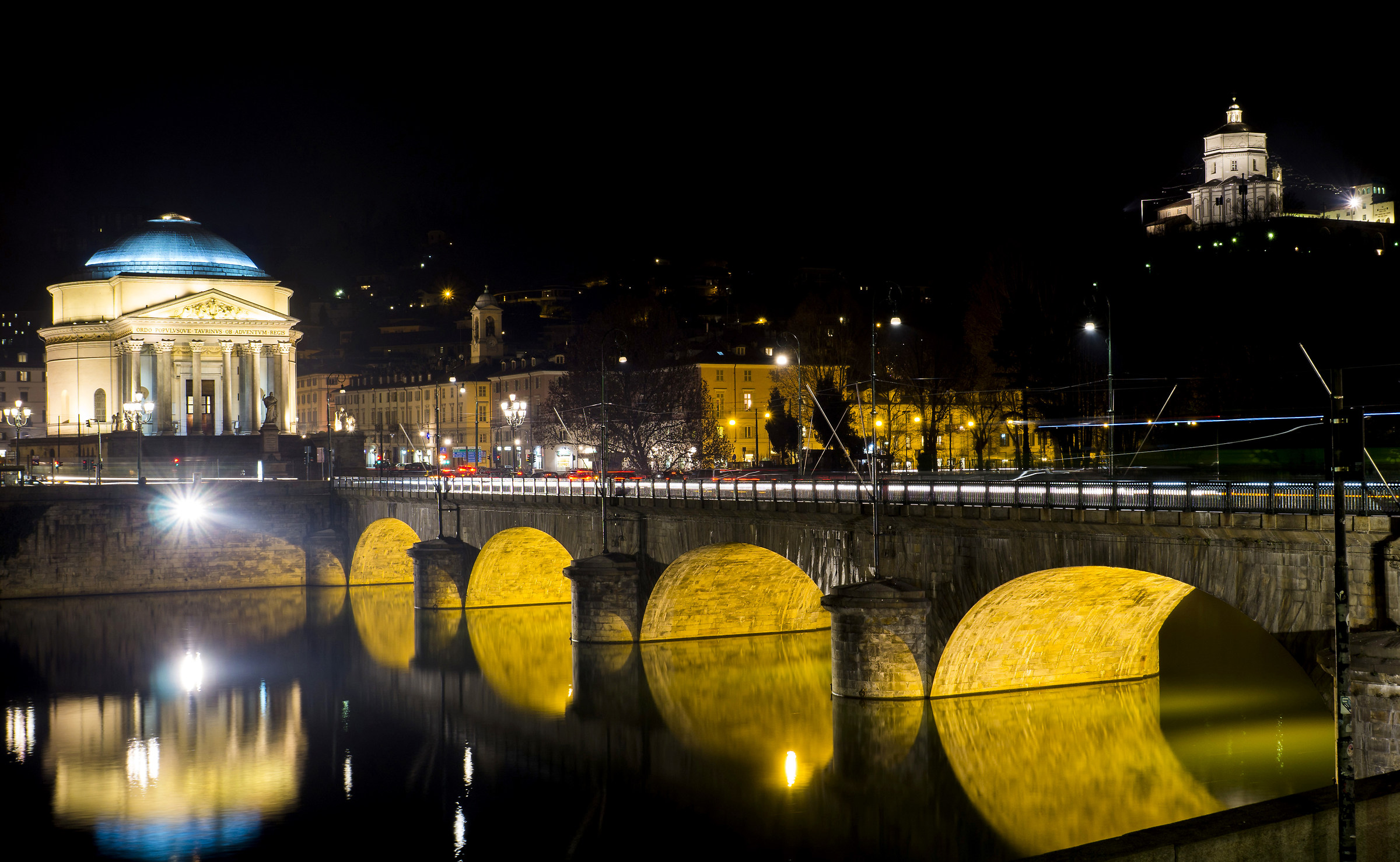
dal mio monitor la vedo "normale", proverò a guardare dal cellulare ma i colori mi sembrano normali (anzi, forse un po' troppo saturi anche sulla gran madre) il faro è un po' invadente ma se chiudo quella luce chiudo anche il resto, non saprei come modificare solo quell'elemento
from my monitor to see "normal", I'll try to watch from the cell but the colors seem normal (indeed, perhaps a bit 'too much saturated even on the mother) The lighthouse is a bit 'pushy but if I close that light I close the rest, I do not know how to change only that element dal mio monitor la vedo "normale", proverò a guardare dal cellulare ma i colori mi sembrano normali (anzi, forse un po' troppo saturi anche sulla gran madre) il faro è un po' invadente ma se chiudo quella luce chiudo anche il resto, non saprei come modificare solo quell'elemento |
| sent on January 25, 2016 (20:57)
mat con colori potrai avere raggione perche non tutti schermi del pc anno visone colori unguali... e per luce alta fai cosi o almeno prova: usa penello e togli bianco e luce a modo selettivo cio è solo a quell faro , se usi photoshop vai alla camera raw e clica sopra su penello e sui slaider abbassi luce alte e bianchi un po e clicca con penello solo su faro due tre volte quannto basta e poi un pellino anche su riflesso dell faro ma forse sono troppo pignolo forse è a posto il riflesso... ciao matt, peter
matte colors can have raggione please all screens pc year mink colors unguali ... and for high light do so or at least try: use penello and remove white and light to selectively what is only at that lighthouse, if you use photoshop go the camera raw and clic on on and on penello slaider lower light high and white and a little click with penello only lighthouse quannto just two or three times and then a Pellino also of reflection of light but maybe I'm too picky maybe it's okay reflection ... hello matt, peter :-) mat con colori potrai avere raggione perche non tutti schermi del pc anno visone colori unguali... e per luce alta fai cosi o almeno prova: usa penello e togli bianco e luce a modo selettivo cio è solo a quell faro , se usi photoshop vai alla camera raw e clica sopra su penello e sui slaider abbassi luce alte e bianchi un po e clicca con penello solo su faro due tre volte quannto basta e poi un pellino anche su riflesso dell faro ma forse sono troppo pignolo forse è a posto il riflesso... ciao matt, peter |
| sent on January 25, 2016 (21:18)
uso camera raw, ma non sapevo di questa funzione! ora mi segno tutto e ci provo! grazie infinite
I serve raw, but I did not know of this function! Now I sign everything and I try! thank you very much uso camera raw, ma non sapevo di questa funzione! ora mi segno tutto e ci provo! grazie infinite |
| sent on January 25, 2016 (21:38)
matto fai come facio io : vai su you tube e scrivi nella ricerca: post produzione in camera raw... vedrai quanta roba ti esce... alucne video buoni altri molto buone... ...pradicamenta vai in camera raw sopra la foto ce una barra trova penello se clichi su penello e poi a fianco su latto destra coreggi tipo aumenti vividezza abbassi luce acetere poi passi con penello dove vuoi e gioco è fatto... prova e ripeti tante volte e vedrai fra qualche giorno diventerai bravo di fare quello che ti serve... basta cercare video vederli e provare... ciao peter
I like doing crazy facio: go to you tube and type in the search: post-production Room Raw ... you'll see how much stuff comes out ... good video alucne other very good ... ... pradicamenta go in camera raw over photo there is a bar penello if clichi on penello and then to the right side of lacto coreggi type increases vividness lower light acetere then steps with penello where you want and you're done ... try and repeat as many times and you'll see in a few days to become good do what you need ... just search for videos and watch them try ... hello peter :-P matto fai come facio io : vai su you tube e scrivi nella ricerca: post produzione in camera raw... vedrai quanta roba ti esce... alucne video buoni altri molto buone... ...pradicamenta vai in camera raw sopra la foto ce una barra trova penello se clichi su penello e poi a fianco su latto destra coreggi tipo aumenti vividezza abbassi luce acetere poi passi con penello dove vuoi e gioco è fatto... prova e ripeti tante volte e vedrai fra qualche giorno diventerai bravo di fare quello che ti serve... basta cercare video vederli e provare... ciao peter |
|

Publish your advertisement on JuzaPhoto (info) |