What do you think about this photo?
Do you have questions or curiosities about this image? Do you want to ask something to the author, give him suggestions for improvement, or congratulate for a
photo that you really like?
You can do it by joining JuzaPhoto, it is easy and free!
There is more: by registering you can create your personal page, publish photos, receive comments and you can use all the features of JuzaPhoto.
With more than 259000members, there is space for everyone, from the beginner to the professional.
|
|
sent on 29 Gennaio 2018 (2:49)
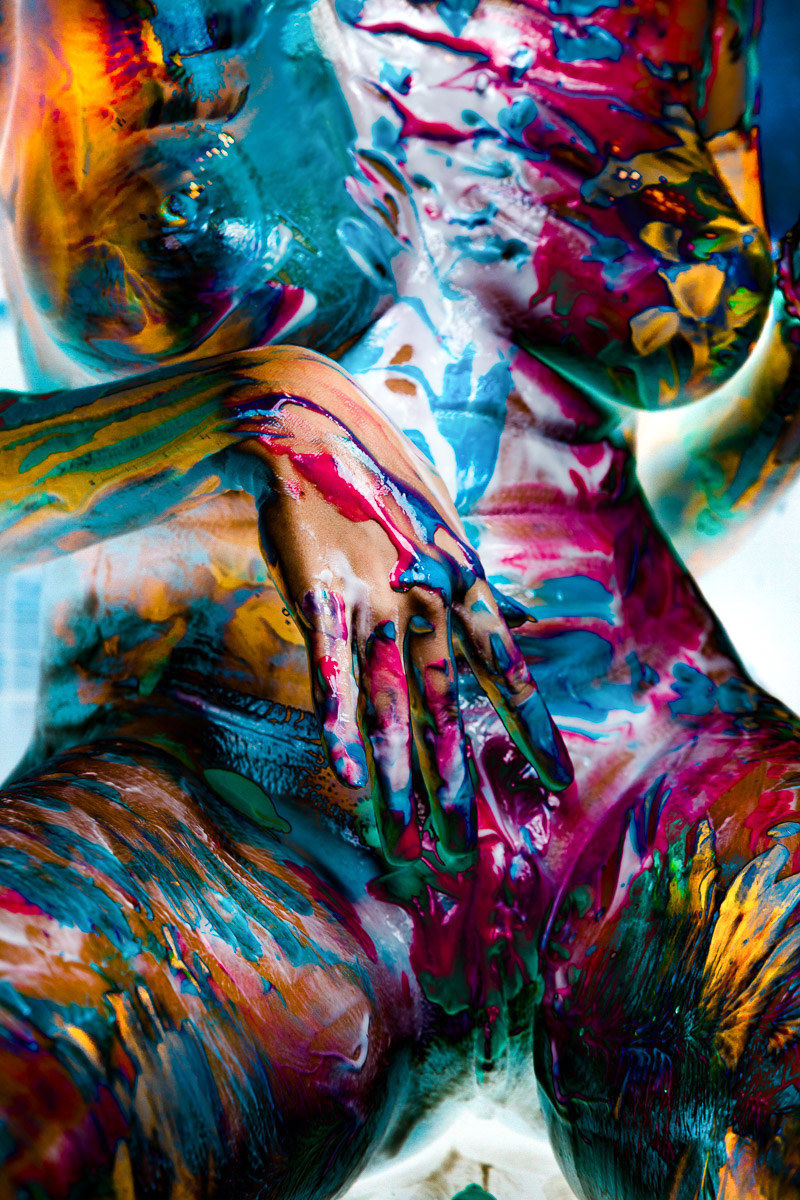
Come promesso tempo fa, illustro la tecnica adottata.
Tutto quello che serve è solo LR e si poteva fare anche in analogico in camera oscura, ovviamente in molto più tempo. E' quindi una procedura fotografica. Non intervengono operazioni grafiche. La scelta della immagina di partenza, come si vede in questo caso, conta molto.
Il procedimento si basa sui seguenti passaggi:
1) Inversione della curva tonale con la forma a "vaso":

Questa forma porta le zone scure a diventare chiare (le inverte come in un negativo), lascia le chiare più o meno come prima (le contrasta) e crea una zona di transizione scura tra le due aree. Tale zona sarà utile per il passo successivo.
Per alcune foto, il risultato può essere già buono così.
Si possono spostare un po' i punti intermedi, i quali alterano la luminosità delle parti scure invertite (ora chiare) e delle parti chiare originali (diventate più contrastate).
Manovrando, invece, il cursore della esposizione si possono equilibrare le parti che finiscono nella zona invertita e quelle che restano nella zona alta dell'istogramma.
Passo 2) serve a riportare alcune zone invertite nella zona normale. Serve quindi a "recuperare" alcune zone. Un caso tipico potrebbe essere la parte in ombra di un viso che, invertita, potrebbe essere poco gradevole. Il trucco è di usare il pennello, un gradiente o uno dei tool di editing locale con il seguente settaggio (che ho definito "Antilisergico" ) : ) :

La magia del recupero è principalmente dovuta al Dehaze negativo, che riesce a "controvertire" l'effetto della curva a vaso. Se applicato con i parametri indicati non soddisfa (viene troppo chiaro o scuro), basta regolare i valori di Dehaze e exposure.
E' importante avere alcune zone dell'immagine riportate alla normalità per dare agli occhi che osservano una "zona di riferimento", la quale rende credibile tutto il resto. Nella foto sopra, la pelle della mano svolge questa funzione percettiva.
Attenzione: piccole variazioni hanno grandi effetti.
Passo 3) Questo è un passaggio puramente estetico e creativo. Prevede di giocare con tutti gli strumenti di LR: curve dei diversi canali, gli slider HSL dei colori, gradienti colorati per alterare i colori e applicare la propria creatività e gusto.
Pass 4) (opzionale) . In alcuni casi è difficile intervenire sui valori dei bianchi o neri perché ogni piccola variazione induce cambiamenti ovunque. Può essere quindi comodo esportare l'immagine (es.: in JPG) quando è creativamente finita, così da congelarla e reimportarla per fare gli ultimi ritocchi (black, white, saturazioni…), senza che il resto si alteri.
Tutto il processo, una volta capito come funziona, non prende più di 1-2 minuti. Però ci si può passare anche molto di più giocherellando. Insomma è un passatempo, oltre che una post produzione.
La buona riuscita dipende molto dalla scelta della foto iniziale: deve avere molti colori e ampie zone chiare o scure.
Buon divertimento.
Come promesso tempo fa, illustro la tecnica adottata.
Tutto quello che serve è solo LR e si poteva fare anche in analogico in camera oscura, ovviamente in molto più tempo. E' quindi una procedura fotografica. Non intervengono operazioni grafiche. La scelta della immagina di partenza, come si vede in questo caso, conta molto.
Il procedimento si basa sui seguenti passaggi:
1) Inversione della curva tonale con la forma a "vaso":
Questa forma porta le zone scure a diventare chiare (le inverte come in un negativo), lascia le chiare più o meno come prima (le contrasta) e crea una zona di transizione scura tra le due aree. Tale zona sarà utile per il passo successivo.
Per alcune foto, il risultato può essere già buono così.
Si possono spostare un po' i punti intermedi, i quali alterano la luminosità delle parti scure invertite (ora chiare) e delle parti chiare originali (diventate più contrastate).
Manovrando, invece, il cursore della esposizione si possono equilibrare le parti che finiscono nella zona invertita e quelle che restano nella zona alta dell'istogramma.
Passo 2) serve a riportare alcune zone invertite nella zona normale. Serve quindi a "recuperare" alcune zone. Un caso tipico potrebbe essere la parte in ombra di un viso che, invertita, potrebbe essere poco gradevole. Il trucco è di usare il pennello, un gradiente o uno dei tool di editing locale con il seguente settaggio (che ho definito "Antilisergico") :
La magia del recupero è principalmente dovuta al Dehaze negativo, che riesce a "controvertire" l'effetto della curva a vaso. Se applicato con i parametri indicati non soddisfa (viene troppo chiaro o scuro), basta regolare i valori di Dehaze e exposure.
E' importante avere alcune zone dell'immagine riportate alla normalità per dare agli occhi che osservano una "zona di riferimento", la quale rende credibile tutto il resto. Nella foto sopra, la pelle della mano svolge questa funzione percettiva.
Attenzione: piccole variazioni hanno grandi effetti.
Passo 3) Questo è un passaggio puramente estetico e creativo. Prevede di giocare con tutti gli strumenti di LR: curve dei diversi canali, gli slider HSL dei colori, gradienti colorati per alterare i colori e applicare la propria creatività e gusto.
Pass 4) (opzionale) . In alcuni casi è difficile intervenire sui valori dei bianchi o neri perché ogni piccola variazione induce cambiamenti ovunque. Può essere quindi comodo esportare l'immagine (es.: in JPG) quando è creativamente finita, così da congelarla e reimportarla per fare gli ultimi ritocchi (black, white, saturazioni…), senza che il resto si alteri.
Tutto il processo, una volta capito come funziona, non prende più di 1-2 minuti. Però ci si può passare anche molto di più giocherellando. Insomma è un passatempo, oltre che una post produzione.
La buona riuscita dipende molto dalla scelta della foto iniziale: deve avere molti colori e ampie zone chiare o scure.
Buon divertimento.
|
|
|
sent on 29 Gennaio 2018 (6:23) | This comment has been automatically translated (show/hide original)
Thanks for the explanation! Grazie per la spiegazione! |
|
|
sent on 29 Gennaio 2018 (9:20) | This comment has been automatically translated (show/hide original)
brilliant and congratulations to you for how you place yourself on this space for everyone.
geniale e complimenti a te per come ti poni su questo spazio a favore di tutti.
|
|
|
sent on 29 Gennaio 2018 (12:32) | This comment has been automatically translated (show/hide original)
Thank you so much Motofoto ... ;-) I'll try soon with the right subject ... antilisergic :-D Grazie mille Motofoto...  ci proverò presto con il giusto soggetto... antilisergic ci proverò presto con il giusto soggetto... antilisergic  |
|
|
sent on 29 Gennaio 2018 (12:38) | This comment has been automatically translated (show/hide original)
To show the effect in "normal" photos, I added this one too:
www.juzaphoto.com/galleria.php?t=2660536
Only the first step of the procedure (tonal vase curve) was enough. Time: 10 seconds. ;-)
Per mostrare l'effetto in foto "normali", ho aggiunto anche questa:
www.juzaphoto.com/galleria.php?t=2660536
E' bastato solo il primo passo della procedura (curva tonale a vaso). Tempo: 10 secondi. |
|
|
sent on 29 Gennaio 2018 (13:15) | This comment has been automatically translated (show/hide original)
Congratulations great job ...!
Complimenti gran bel lavoro...!
|
|
|
sent on 29 Gennaio 2018 (22:17) | This comment has been automatically translated (show/hide original)
I really like impact 8-) mi piace molto di impatto |
|
|
sent on 31 Gennaio 2018 (11:08) | This comment has been automatically translated (show/hide original)
In addition to the beautiful image very impact compliments and thanks for the technical report very useful to everyone
good bravo ciaoo Alfonso Oltre alla bellissima immagine molto d'impatto complimenti e ringraziamenti per la relazione tecnica molto utile a tutti
bravo bravo ciaoo Alfonso |
|
|
sent on 03 Febbraio 2018 (14:57) | This comment has been automatically translated (show/hide original)
Beautiful there ...
Thanks Motofoto ... Bella lì...
Grazie Motofoto... |
|
|
sent on 03 Febbraio 2018 (22:15) | This comment has been automatically translated (show/hide original)
Once again I join the group of those who appreciate your work and the quality of the technical contents you share, a greeting and thanks again! Mi aggrego ancora una volta alla schiera di quelli che apprezzano il tuo lavoro e la qualità dei contenuti tecnici che condividi, un saluto e grazie ancora! |
|
|
sent on 07 Febbraio 2018 (23:36) | This comment has been automatically translated (show/hide original)
Thanks for sharing :-)
Original result and strong impact.
Congratulations again. Grazie per la condivisione :-)
Risultato originale e di forte impatto.
Ancora complimenti. |
|
|
sent on 08 Febbraio 2018 (0:40) | This comment has been automatically translated (show/hide original)
I thank all the "brave" who have passed these parts. :-) Ringrazio tutti i "coraggiosi" che sono passati da queste parti. |
|
|
sent on 09 Febbraio 2018 (8:16) | This comment has been automatically translated (show/hide original)
Congratulations on the imagination and achievements and thanks for sharing the used procedure.
Peppe Complimenti per la fantasia e le realizzazioni e grazie per aver condiviso il procedimento usato.
Peppe |
|
|
sent on 10 Marzo 2018 (10:22) | This comment has been automatically translated (show/hide original)
Motooo, I managed ... now I have to find the subject and the right photo !!! :-D
Motooo, ci sono riuscito... adesso devo trovare il soggetto e la [negozio 24]atta!!!
|
|
|
sent on 10 Marzo 2018 (19:57) | This comment has been automatically translated (show/hide original)
:-)
Good!
Once learned, the procedure repeats itself quite easily.
Experiment, because not all photos lend themselves to this type of treatment.
If you find any interesting variant, get it done ;-)
Bene!
Una volta imparata, la procedura si ripete abbastanza facilmente.
Sperimenta, perchè non tutte le foto si prestano a questo tipo di trattamento.
Se trovi qualche variante interessante, fatti vivo
|
|

Publish your advertisement on JuzaPhoto (info) |



 JuzaPhoto contains affiliate links from Amazon and Ebay and JuzaPhoto earn a commission in case of purchase through affiliate links.


 Resize to fit window


![[en]](shared_files/layout/country_flags/flag_196.jpg)