user15476
|
inviato il 30 Settembre 2017 ore 1:31
“ Lavorare in uno spazio in quadricromia, in ambito fotografico, è sconsigliabile. „
Si è vero, ma spesso guardo anche alla prestampa; in teoria i profili CMYK (classe output) devono essere per forza a tabella quindi permettono l'intento percettivo (AtoB0, BtoA0) e spazio di connessione LAB.
“ Photoshop, ad esempio, usa sempre un intento relativo con compensazione del punto del nero, a prescindere da come è costruito il profilo del monitor. „
Quindi è ingannevole quando nella gestione colori del PC è impostato "percettivo", se il profilo del monitor non è di tipo a tabella; sarà sempre colorimetrico con taglio del gamut e comunque PS usa sempre l'intento relativo. Magari è anche meglio così.
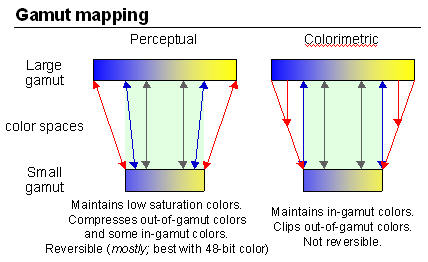
|
user15476
|
inviato il 30 Settembre 2017 ore 9:49
“ Gli spazi AdobeRGB, sRGB, ProPhoto, RaamielRGB, sono quasi sempre costruiti come matrix e questo implica forzatamente l'uso di XYZ come PCS; tuttavia nulla vieta di costruirli come cLUT dove puoi usare indistintamente LAB o XYZ „
PS: di questi spazi non esistono le varianti ICC v4, quindi la conversione può essere solo colorimetrica ad esempio verso AdobeRGB. Tuttavia eciRGB ha una versione v4 quindi in teoria si può usare il percettivo quando si converte da ProPhoto RGB? |
user15476
|
inviato il 30 Settembre 2017 ore 11:17
Ma allora, esiste una filiera che permette di comprimere il gamut, mantenendo il volume, oltre la seguente: Camera Raw > Prophoto > CMYK (percettivo)?
|
|
|
inviato il 30 Settembre 2017 ore 11:35
Comprimere il gamut mantenendo il volume?  |
user15476
|
inviato il 30 Settembre 2017 ore 12:01
“ mantenendo il volume? „
Tralascio quest'ultimo concetto che comunque si può intendere così:
[...] You'd be surprised by how many colors frequently captured in fashion photography are out of gamut in adobeRGB but in gamut in ECIrgbv2 and in Fogra39. And then there's the volumes, and the use of perceptual intent. We get the volumes right, and then we bring them back to max saturation available.
La questione era come comprimere il gamut di uscita da Camera Raw, senza poi necessariamente lavorare in CMYK, allora una soluzione era:
Camera Raw > ProPhoto > CMYK (percettivo) > Spazio di lavoro RGB (relativo)
Solo il CMYK permette il rendering percettivo.
[...] With a raw camera data workflow, one can simply setup their preferred rendering instructions in ACR, then render out to ProPhoto - then perceptually map to CMYK. One can then render to ECI and then perceptually map to CMYK. These "conversions" may simply happen on the fly as a softproof. One can then compare the two files to see if anything critical is going to be lost in the ECI RGB conversion. This should be pretty fast and easy to do upstream early in the workflow, before any retouching or other work is done in Photoshop. At least one knows what is happening with subtle gradations or detail which may be clipped in ECI RGB without the user ever knowing it was there. Remember, the detail may never appear in the monitor or editing colour space and may only show if it was preserved when going from ProPhoto RGB to perceptual CMYK. If one converts to ECI RGB upon receiving the ProPhoto image from ACR - then the data may be clipped and one may never know what one is missing out on! Seems safer to me to open the ACR render as ProPhoto, softproof to CMYK and then make important decisions.
Ovviamente il tutto è orientato alla prestampa. |
|
|
inviato il 30 Settembre 2017 ore 13:30
Mi sembra un modo di rendere complicato il semplice passando per l'inutile... |
user15476
|
inviato il 30 Settembre 2017 ore 13:52
In effetti si.. |
Che cosa ne pensi di questo argomento?
Vuoi dire la tua? Per partecipare alla discussione iscriviti a JuzaPhoto, è semplice e gratuito!
Non solo: iscrivendoti potrai creare una tua pagina personale, pubblicare foto, ricevere commenti e sfruttare tutte le funzionalità di JuzaPhoto.
Con oltre 259000 iscritti, c'è spazio per tutti, dal principiante al professionista. |

Metti la tua pubblicità su JuzaPhoto (info) |

 JuzaPhoto contiene link affiliati Amazon ed Ebay e riceve una commissione in caso di acquisto attraverso link affiliati.